Change the language of your account
The Zamn platform supports Arabic and English. You can choose the language of the platform screens from the Edit Profile page.
How to change the language
If you do not see the Localization section on the Edit Profile page, your platform does not offer a language change.
-
Click your profile icon.
-
Choose Edit Profile.

-
Go to the Localization section at the bottom of the page.
-
Choose the language you want from the Language list.
-
Click Save Changes.
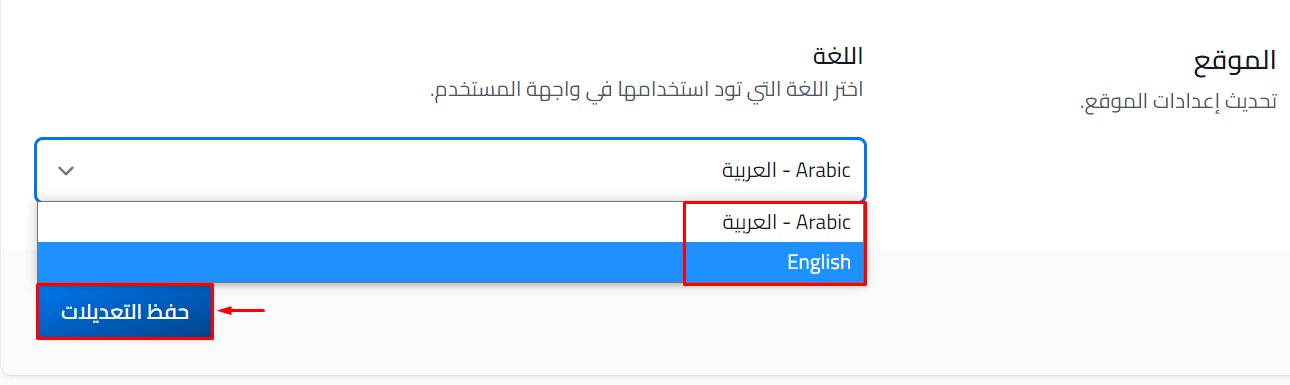
To change the language again, click your profile icon and choose Edit Profile. If the platform is in Arabic, it is the first option in the menu.
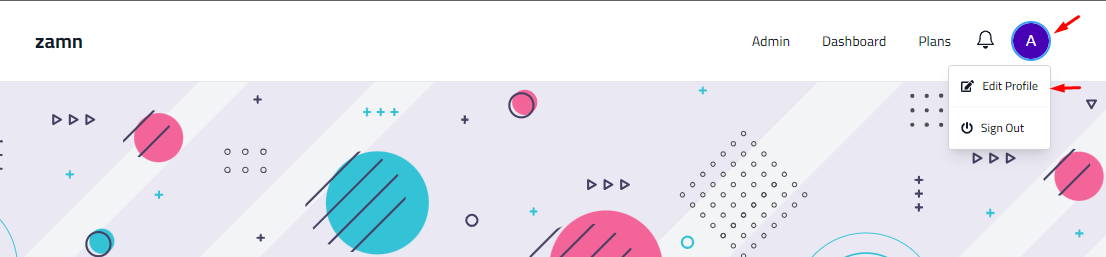
You can change the language from any page on the platform. Click your profile icon, then choose Edit Profile.
If you see a globe icon at the top of the page, click it to switch between Arabic and English right away.